From CAD and drawing To quote and routing, automatically
To quote and routing, automatically
Two inputs. One calculation against your machines.
Geometry tells us what it is.
The drawing tells us what it must become.
Know the part.
Know the process.
Know the cost.
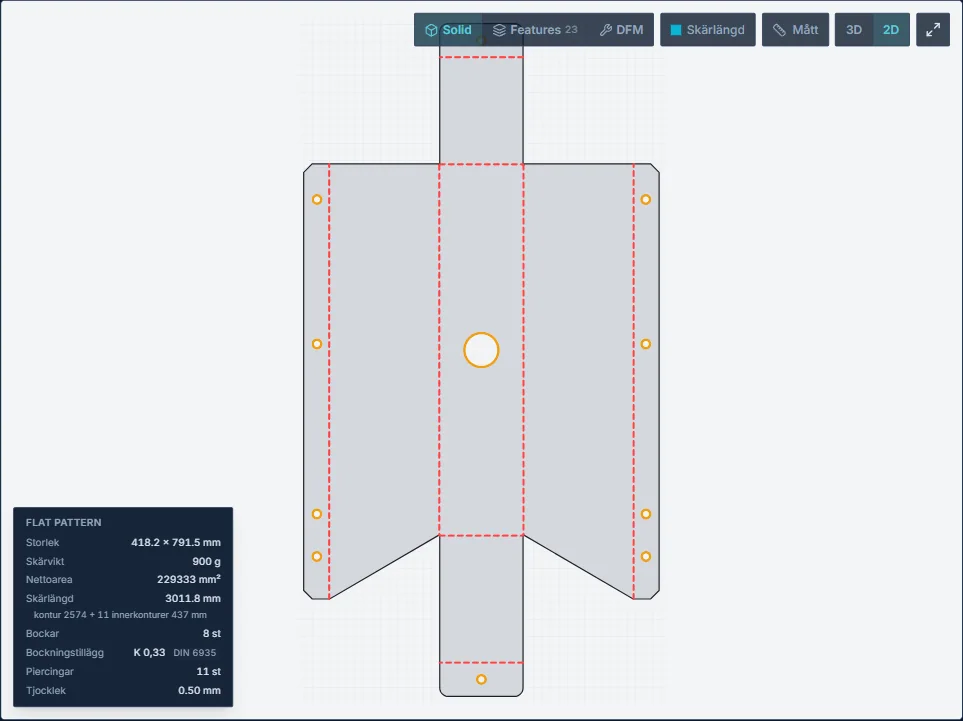
- Outer contour
- Inner contour
- Piercings
- Positioning time
- Motion dynamics
- Capacity utilisation
- 8 bends · R0.50
Best production route selected
Costed against your machines
Amounts come from your rates. Geometry only carries the measurements.
From RFQ to a quote and a finished routing.
CAD analysis. Drawing requirements. DFM. Operations and times. Costing in Monitor's format. One workflow.
From request to quote and finished routing
Glintify does what an estimator does by hand today. It reads the customer's CAD file and drawing, understands the part and works out operations and times against your machines. It then prices the part with your own costing model. The result is both a quote and a routing that can go straight into your ERP.
- 01 · STEP · DXF · PDF
Reads the input automatically
STEP and DXF files are read together with their PDF drawings, straight from the request or the email. Material, tolerances and weld symbols on the drawing are linked to the right part in the 3D model.
- 02 · Holes · bends · welds
Identifies features
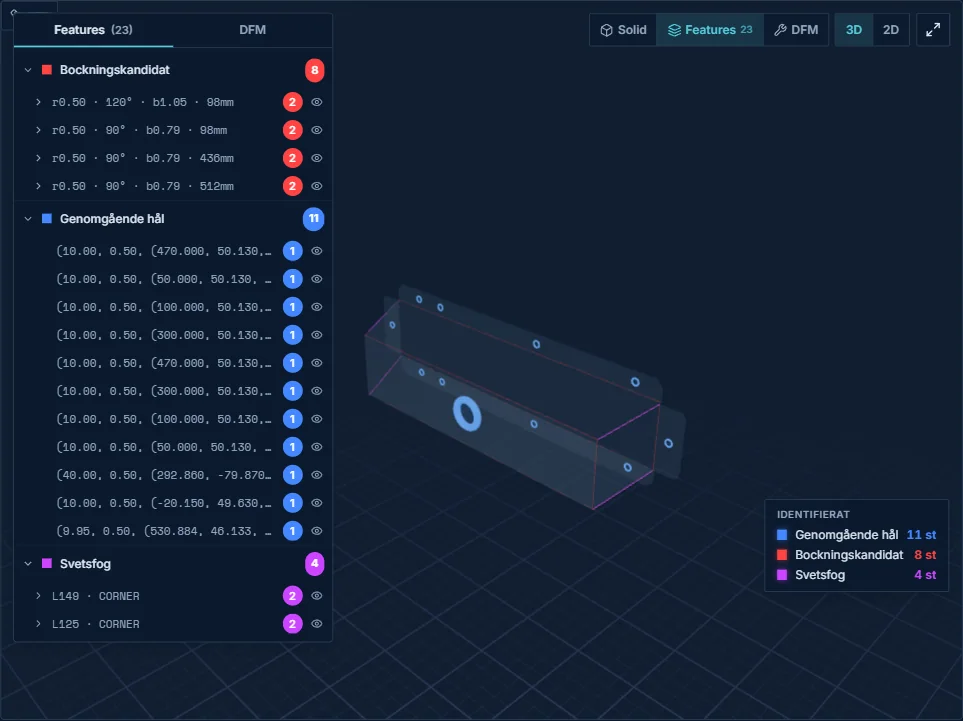
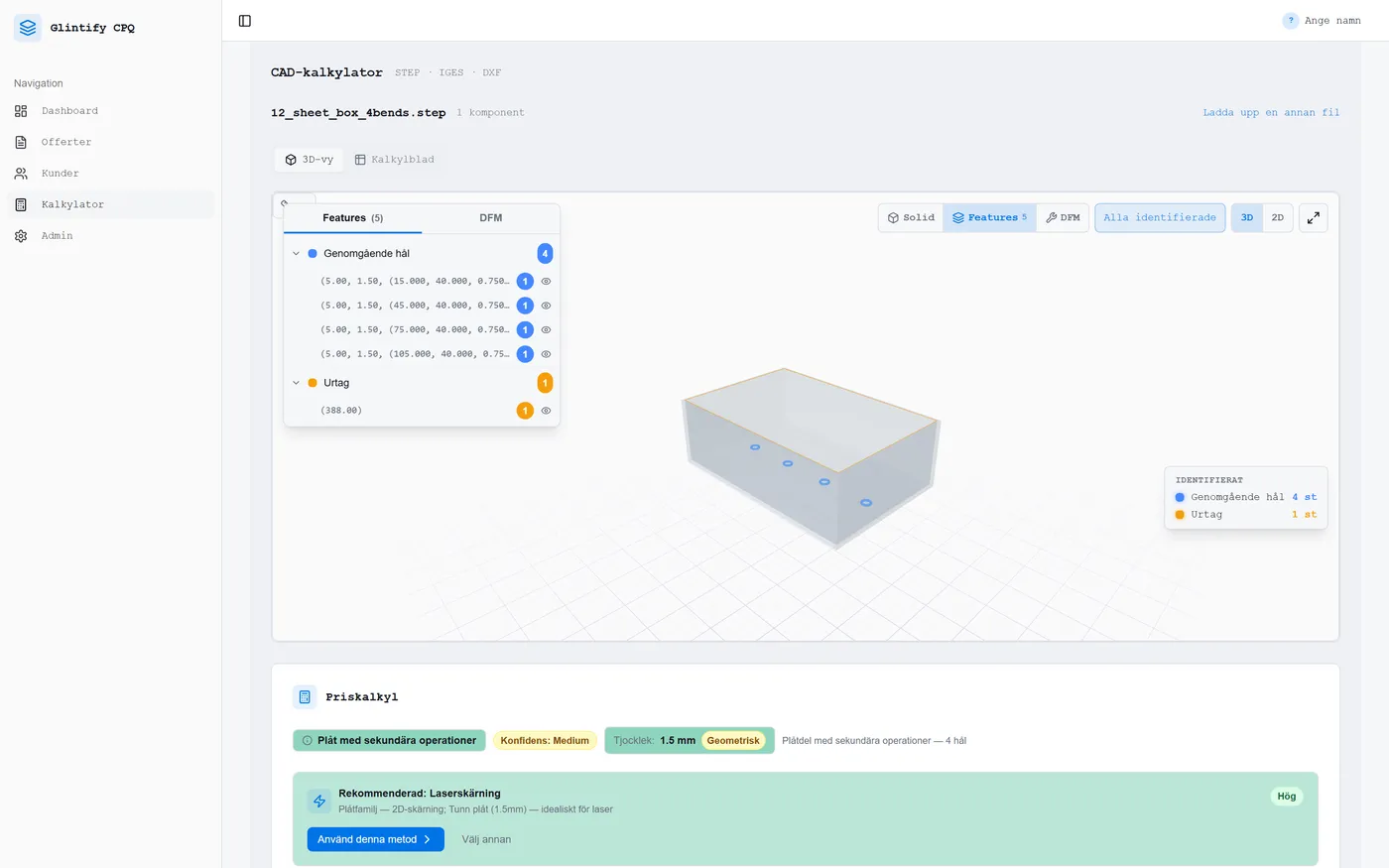
The geometry shows holes, threads, bends, cutouts, countersinks, formed features and weld seams. Sheet metal parts are unfolded into a flat blank with cutting length and pierce count.
- 03 · DFM
Finds manufacturing problems
DFM (Design for Manufacturing) covers things in a design that look right on the drawing but cause trouble on the shop floor. Examples are a hole so close to a bend that it distorts, a flange too short for the press brake and a hole too small for the laser. It can also be a tolerance the machine cannot hold. Glintify finds these before you quote.
- 04 · Purchased parts
Recognises purchased hardware
Nuts, washers, screws, pins, retaining rings and hinges are recognised from their geometry, not just their name. They are costed as purchase and assembly, not as parts you manufacture or weld.
- 05 · Operations
Chooses operations and machine
Geometry, material and your machines decide which operations the part needs: laser, punching, press brake, welding, tapping or surface treatment. Glintify also picks the machine that can do the job and calculates setup and cycle time for each operation.
- 06 · ERP
Creates the article and routing
Glintify reads your production groups (work centres) from your ERP. It can also create the article automatically with structure, material and operation lines with setup and piece time. Nothing needs to be entered twice in Monitor.
Handles complex assemblies, not just simple sheet parts
Our record so far is 250 components in a single STEP file. Glintify separates manufactured parts, purchased hardware and sub-assemblies and measures the weld joints between parts. It also tells a real weld apart from a part that only passes through a hole.
Faster calculation
The STEP file becomes a ready calculation basis with material, operations, times and price lines.
Your own pricing logic
Hourly rates, markups, material rules and margin targets follow the way your company calculates.
Estimator time saved
Features, operations, setup times and cycle times come from the geometry. The routing is ready when the quote is.
Faster quote flow
Go from STEP file to traceable quote basis in minutes and answer before the customer waits for the next price.
Manual calculation slows every quote
When dimensions, material, processes and pricing rules are assessed by hand, every quote gets slower and more dependent on individual people. The cost shows up in estimating time, response time and calculations that are hard to compare across jobs.
Hours disappear into every quote
Dimensions, operations and cost drivers are reviewed and entered by hand. That ties up your most experienced estimators instead of letting them handle the exceptions.
Pricing logic lives in Excel and heads
When hourly rates, markups, setup times and material rules are handled differently from person to person, it's hard to know why two quotes differ.
Response time slows the deal
When a quote takes days, faster competitors respond while the customer's need is still current.
Costing in the same format as Monitor
Glintify calculates in two steps. First the time: every operation gets setup and cycle time from the geometry and your machine data. Then the price: time is costed per production group with your cost factors, and the overheads MO, LO, AFFO and profit are applied exactly as in Monitor's pre-calculation. If you prefer a margin on our own time calculation, that works too, and you choose per process.
Time comes from the geometry
Cutting time is calculated from contour length and pierces, bending time per bend and welding time per metre of joint. This is the technical cycle time, the same time a CAM programmer would calculate.
Piece time and setup time
Piece time = cycle time × (1 + allowance %). Setup time applies to the whole batch and is spread over the quantity. It is never multiplied by the quantity.
Production group rates
The cost factors are machine, wages + social charges and fixed manufacturing overhead in SEK/h, with staffing factors for setup and piece time. They are the same factors and production groups as in your ERP.
The overhead chain
Material + MO (material overhead), subcontracting + LO (subcontract overhead) and processing make up the manufacturing cost. AFFO (administration and sales overhead) gives the full cost, and the profit markup gives the quoted price. You choose the base for each markup.
| Material, S355 3 mm (net weight + scrap) | 42.00 |
| MO, material overhead 8% | 3.36 |
| Subcontract, galvanising | 6.00 |
| LO, subcontract overhead 5% | 0.30 |
| Processing | 61.40 |
| Laser · WC 110 · setup 10 min, piece 0.9 min | 14.20 |
| Press brake · WC 210 · setup 25 min, piece 1.1 min | 17.60 |
| Welding · WC 310 · piece 4.2 min | 29.60 |
| Manufacturing cost | 113.06 |
| AFFO 12% on material + processing | 12.81 |
| Full cost | 125.87 |
| Profit 15% on processing + AFFO | 11.13 |
| Quoted price per piece | SEK 137.00 |
Example. Rates and percentages are your own. They are set per company, and profit can be changed per quote.
Transparent pricing, line by line
Every cost in the quote is derived from the geometry and your calibrated parameters. No hidden markups, no rules of thumb, every line traces back to a feature in the part.
- Material S355 4 mmSheet area × weight × price + scrapSEK 48.20
- Cutting time, 2.4 m contourContour length / speed × hourly rateSEK 14.20
- Pierces × 1212 holes at SEK 0.20SEK 2.40
- Nesting & scrap8% scrap factorSEK 5.80
- Setup & changeoverBatch 50 pcs, setup time SEK 425SEK 8.50
Risks are flagged before they reach the shop floor
Quality work starts when you quote. Glintify compares the geometry and the drawing's tolerances with your machine capability. Anything likely to go wrong, get expensive or be impossible to make is flagged, with the reason in plain language.
Tolerances against the machine
Every ± tolerance on the drawing is checked against the selected process and machine. If the laser cannot hold it, you see it straight away in the calculation.
Machine capacity
Bending force is compared with the press brake's tonnage, and the blank with the sheet format and the machine bed. Holes too small for the laser are moved to drilling.
Design risks (DFM)
Holes near bends, short flanges, tight radii and uncertain unfolds are marked in 3D with expected and actual values.
Welding and assembly
Weld symbols on the drawing are linked to the seams in the model. A part that only passes through a hole counts as a fit, not as a weld.
No guessed prices
If thickness is missing, the geometry is uncertain or something cannot be verified, the price is blocked. The line then goes to review instead of becoming zero.
Traceable decisions
Every flag and every approval is saved with the quote, so the next estimator can see why the part was costed the way it was.
Understands the geometry in depth
Glintify calculates the correct flat blank size and flags manufacturing risk before the quote is sent. The technical depth is there whenever you want to review it.
Correct blank size
Correct blank size even on complex, multi-bend parts.
Uncertainty is shown immediately
The system flags when the unfold is uncertain, you don't guess.
DIN 6935 when it matters
K-factor per bend to DIN 6935 (German industry standard).
15 DFM checks, automatically
Every part is checked against your thresholds, expected vs. actual, flagged in 3D.
See all DFM checks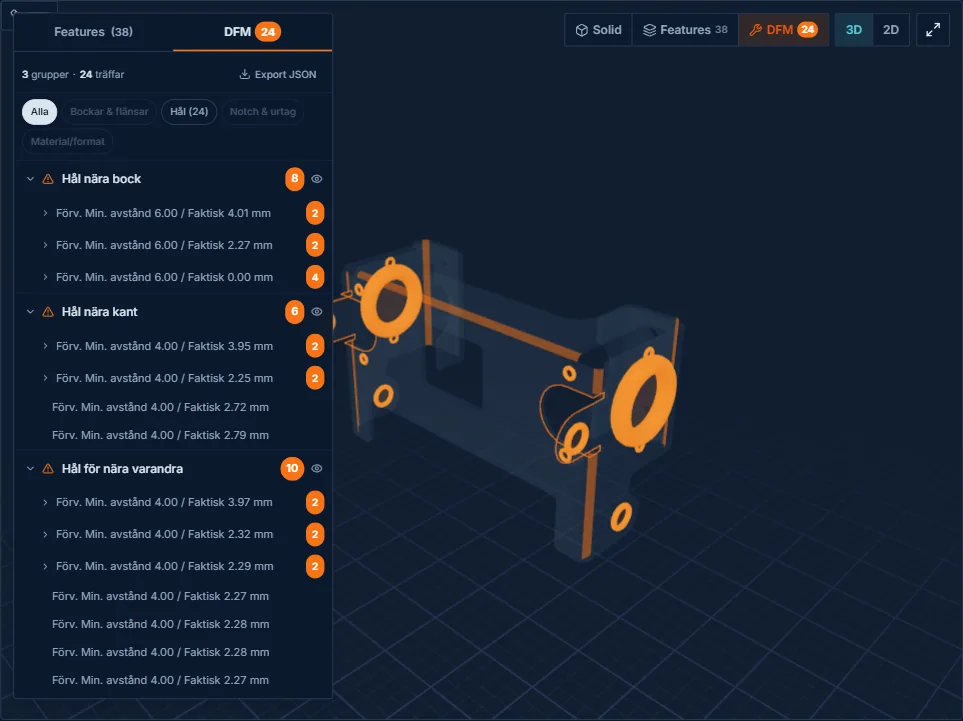
See how geometry becomes decision support
Choose a part. Click 3D, 2D, Features or DFM — the same Geometry Viewer as in the platform.
Calibrated to your machines. Not industry averages.
Most quoting systems rely on generic industry data. Glintify is calibrated to your actual machines, your speeds, your hourly rates, your DFM thresholds. That's the difference between an estimate and a calculation.
- Machine-specific cost parameters, your hourly rates, your speeds
- DFM rules tailored to your actual capacity
- Material catalog with your standard materials and sheet sizes
- AI-assisted RFQ reading that suggests material, quantity and finish
- Weld seams, flat pattern and K-factor to DIN 6935
One platform for the whole sheet metal chain
Built for the whole company
Glintify isn't just a quoting tool, it gives every role in the company better visibility and control.
From zero to first quote in 6-12 weeks
A clear four-phase process. You run in parallel with your current system until confidence is there, typically 6-12 weeks from start to first quote.
Glintify reads production groups from your ERP. Won quotes can become articles with structure, material and operation lines with setup and piece time, directly in Monitor for example. Nothing has to be typed in twice.
Latest from the blog
Guides and deep dives on quote automation, DFM, nesting and CAD data for the sheet metal industry.
Answers to what you want to know
See how fast your calculation can become a quote
Bring a STEP file for a part you quote often. In 30 minutes we'll show how Glintify reads the geometry, builds the calculation with your machine data, and prepares it as quote-ready basis.
We set it up together with you · Calibrated to your machines · English-language support