15 DFM checks, calibrated to your machines
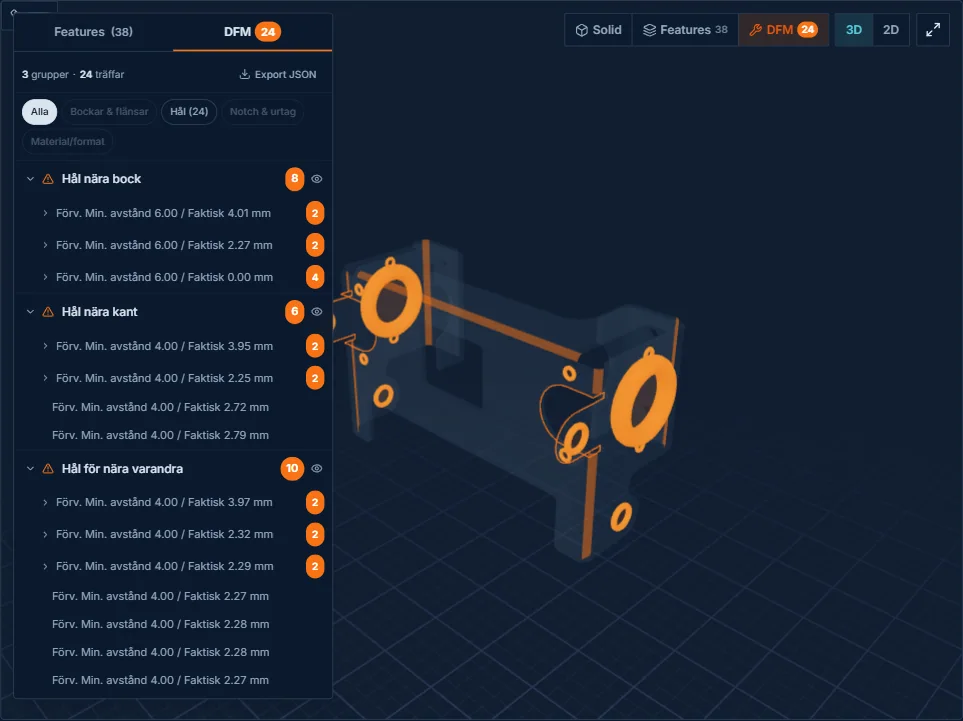
Manufacturability problems are identified automatically on the flat pattern before the part reaches the shop floor. Every check shows expected vs actual value. Thresholds are set against your capacity, not industry averages.
15 ways to catch problems before it's too late
Each check measures a specific manufacturability criterion. Thresholds are configurable per machine, not generic industry values.
Every warning shows code, type, expected value and actual measured value, no abstract error messages.
Distance < 3 × sheet thickness → warning
Flange height < 3 × sheet thickness → warning
Distance < 2 × sheet thickness → warning
Radius < 1 × sheet thickness → warning
Varying radius on the same part → warning
Slot ends < 3 × thickness from bend line → warning
Bridge width < 2 × thickness → warning
Fillet radius out of tolerance → warning
Hole overlaps bend zone → warning
Cutout width < 2 × thickness → warning
Hem length < 5 × thickness → warning
Hem bend at corner without relief → warning
Parallel edges < 3 mm apart → warning
Forming depth exceeds material yield point → warning
Bend sequence collides with a previous bend → warning
From geometry to manufacturability
The DFM checks aren't generic warnings, every threshold is calibrated to your machines' capacity. A warning means the part risks a problem in your specific production.
Configurable thresholds
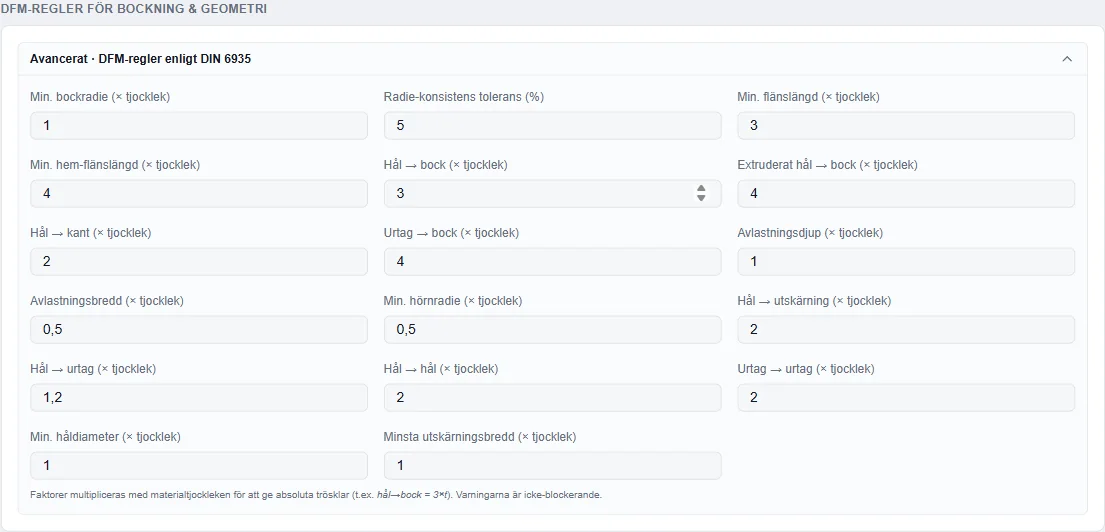
Set your own limits per machine and material. The system adapts all 15 checks to your capacity.
3D visualization
Every warning is marked directly in the 3D view, you see exactly where the problem is.
Expected vs actual
Each check shows the measured value and the limit side by side. The deviation is instantly readable.
Automatic prioritization
Critical warnings (that stop production) are shown first. Informational warnings further down.
Thresholds are set against your machines
At onboarding, all DFM thresholds are calibrated to your machine fleet, your materials and your tolerance requirements. The checks then run automatically on every part uploaded.
DFM is part of the whole chain
The DFM checks run on the flat pattern from the flat pattern module. Results affect costing and quote data.
See DFM on your own CAD file
Upload one of your parts and see which DFM warnings the system finds, calibrated to your machines, directly in the 3D view.
Also read our guide to DFM risks in bent sheet metal.
Try your part