The short answer
No. Sheet metal quote automation is not a system where you upload a CAD file and receive a finished production decision. CAD analysis can measure the part. For the calculation to reflect your reality, the system also needs to know which processes you offer, which machines and tools you have, which materials you run, how you account for setup, and when an estimator must review the result.
The CAD file shows the part — not your shop
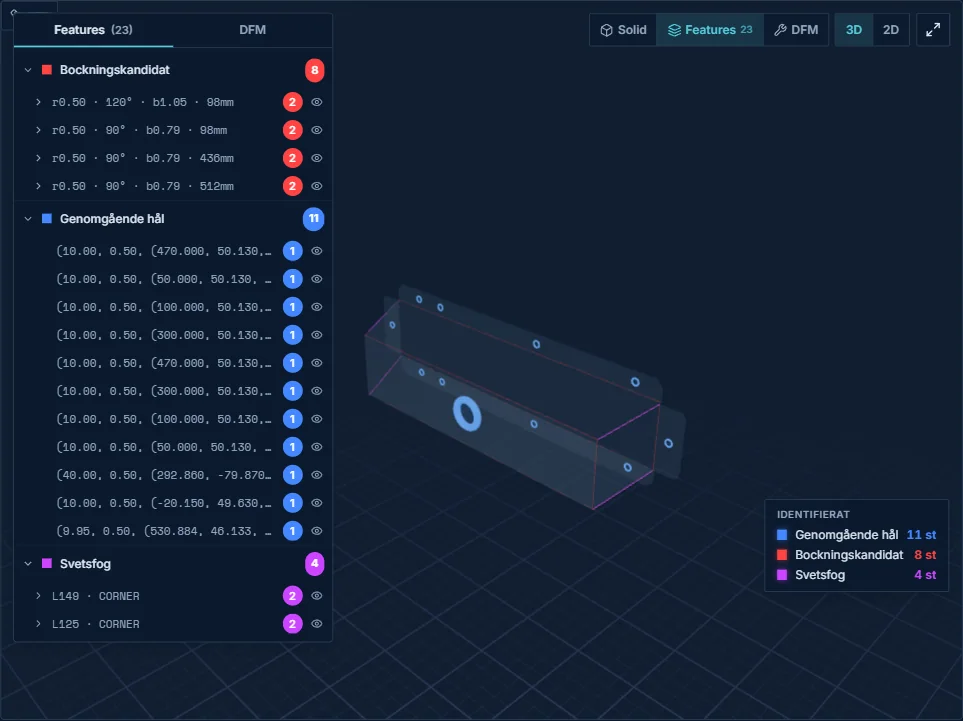
A STEP file can describe geometry: contours, holes, bends, cut-outs, surfaces and assembly components. Geometry Viewer can surface that information and connect it to cut length, pierce count, bend lengths, material area and DFM risks.
But the same part can be made differently at two shops. One has laser cutting and press brakes; another works with plasma and heavy plate. One has a robot cell for repeat series, another chooses a manual press for prototypes. The CAD model is the same. The production decision is not.
Drawing requirements should become the right calculation choice — or a clear review point
In the RFQ flow, the drawing PDF is analysed and its requirements are connected to the relevant part, feature, assembly or quote level. Material, thickness, holes, bend angle and flat dimensions can then be compared with the analysed CAD geometry. This makes it clear whether drawing and model agree, rather than treating them as two separate attachments.
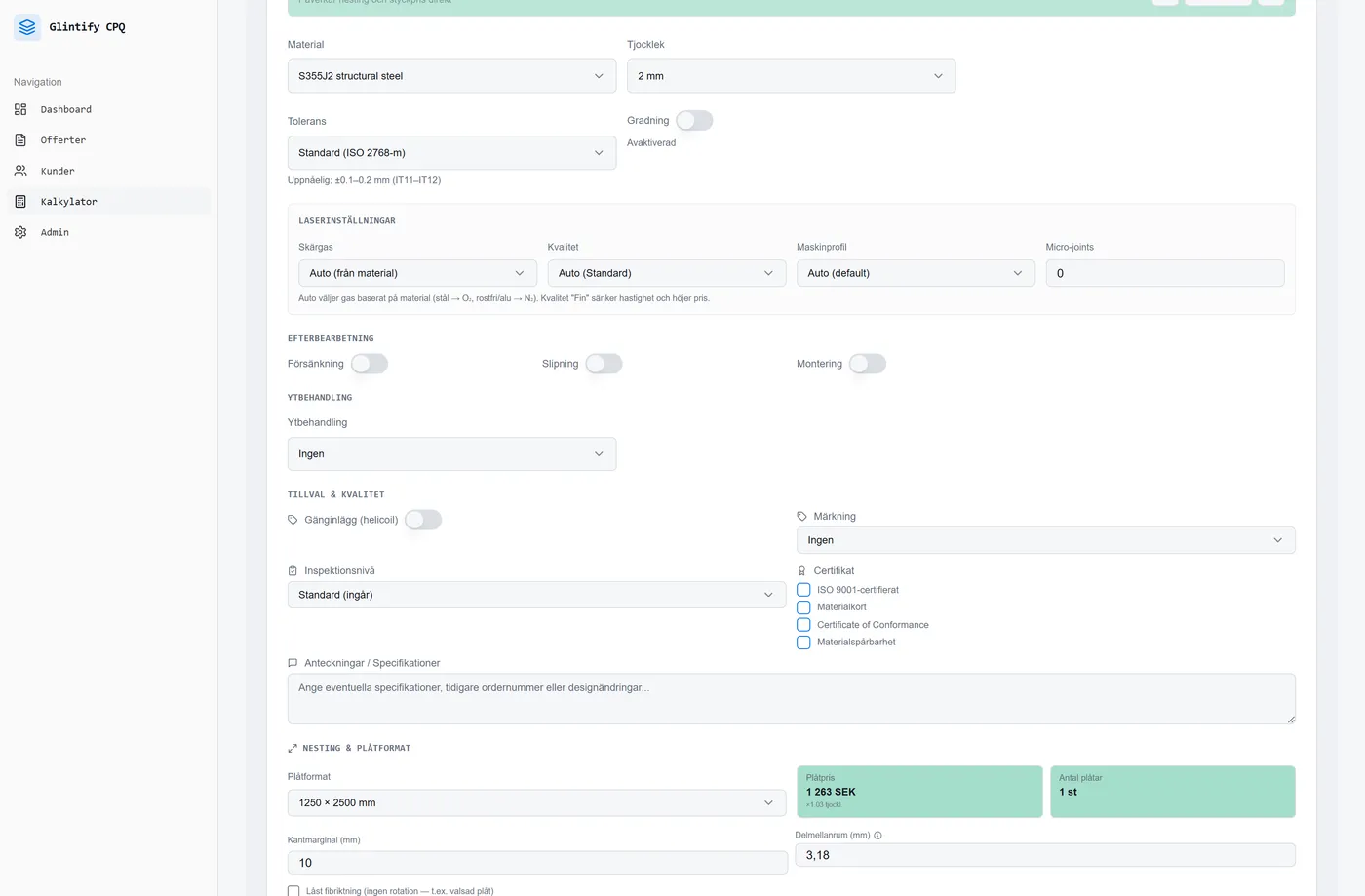
Some known drawing requirements are carried into the calculation as choices for production operations: for example deburring, grinding or brushing, assembly, formal inspection and certificates. A directional finishing requirement can also constrain nesting by limiting part rotation. But detecting a requirement in a drawing is not the same as having a finished price: if a cost model, process or confirmed capability is missing, the requirement becomes a blocker or review case. That is how the calculation avoids guessing.
See also how CAD analysis creates a measurable basis and how cost calculation connects it to your own rules.
Three data layers in a traceable quote
| Data layer | Example | What it controls | Owner |
|---|---|---|---|
| CAD geometry | Holes, bends, contour, area, cut length | Measurable quote basis and DFM indications | Deterministic CAD analysis |
| Drawing requirements | Deburring, directional finish, assembly, inspection, certificates | Calculation choice, geometry validation or a clear review point | Drawing analysis and estimator |
| Shop data | Machine profile, V-die, sheet format, speed, setup time | Which process or machine is realistic and how the calculation is built | Company calibration |
| Business decision | Tolerance, finish, method choice, subcontract work, margin | What can be offered and which price can be sent | Estimator and responsible salesperson |
Machine capability must be part of the calculation
Here, machine capability means what a machine can and should actually do: bend force, bend length, material and thickness limits, tooling, working envelope, sheet format and part weight. That is different from the geometry that comes from the CAD file.
In Glintify's machine selection, a machine with unknown capability is not automatically an approved option. If a bend is too long, needs too much force or lacks verified tooling data, it should appear as a review case. The system should not fill that gap with an anonymous industry assumption.
Three reasons generic defaults create the wrong answer
A punching or combination machine can have a higher technical limit on paper than the range a shop uses in normal production. If a calculation follows only the data sheet, it can recommend a process the company does not want to promise. Confirmed working practice must therefore take precedence over a generic specification.
For bending, knowing that a part has a 90-degree bend is not enough. A small precision part may fit a smaller press, while a long bend needs another machine. In serial production, faster tool change or automated handling can matter — but only when setup, cycle time and quantity are calculated for the specific order.
Process selection is also company-specific. A heavy-plate shop may prioritize plasma or oxy-fuel within its defined ranges and not offer laser at all. Sheet metal quoting software should explain that route, not treat laser as a universal default.
Automation starts with shared rules, not a black box
Implementation is therefore about capturing shop decision logic: materials and grades, machines, tool libraries, speeds, gases, setup time, finishing, margin and review rules. Historical quotes are often a useful starting point for finding rules that otherwise exist only in people's heads or scattered spreadsheets.
A part being flagged for review is not a failure. It is how you automate the clear cases while making uncertain cases visible before a price is sent. The system calculates and explains; the estimator approves or corrects.
What should be reviewed before an automated quote is sent?
- Is the CAD file the right revision and does it cover the full customer requirement?
- Are material, quantity, tolerance, finish and drawing requirements present?
- Has the drawing requirement been connected to a calculation choice, validation or review case without assuming a cost?
- Can a verified machine handle the part's length, force, weight and working envelope?
- Is tooling and process selection calibrated for your shop?
- Have uncertain or subcontracted operations been clearly marked rather than guessed?
Automation that fits your shop
The best quote automation does not pretend every factory works the same way. It makes both CAD data and drawing requirements useful in your operation: against your machines, materials, processes and decision points. Clear quotes become faster, while difficult cases receive the right attention.
To see which rules can be captured from your historical quotes and machine data, book a calculation review with one of your own STEP files.
Frequently asked questions
Is sheet metal quote automation plug-and-play?
No. CAD gives geometry, but a useful calculation also needs the company's machines, tools, materials, processes, costing rules and review points. The goal is not a generic quote, but a traceable basis for your shop.
What does machine capability mean in a quote calculation?
It means verified production limits and conditions such as force, length, material and thickness limits, working envelope, weight and tooling. It should not be confused with a live plan of today's available machine hours.
Can the same CAD file receive different quotes at different shops?
Yes. Geometry is the same, but machine parks, processes, tooling, material prices, setup time and margin rules differ. Costing rules therefore need company calibration instead of an anonymous average.
How are drawing requirements used in the RFQ flow?
Drawing requirements are connected to the part, feature, assembly or quote level. Known requirements can bring deburring, grinding or brushing, assembly, inspection and certificates into the calculation basis. A requirement without a verified cost model, process or capability becomes a review or blocking case instead.
When does an estimator still need to review?
When CAD data is incomplete, capacity or tooling data is missing, the drawing contains requirements not visible in geometry, or several processes are possible. Automation should expose these exceptions rather than hide them.
Bring a part you have quoted before and your real machine rules. We will show what can be measured, what can be configured and what should be reviewed.
Book a calculation review