What has Anthropic launched?
On 12 November 2026, Anthropic launched Claude for Manufacturing. The plugin includes 17 skills and connectors for Autodesk Fusion, Infor, Microsoft 365 and Oracle NetSuite. It helps draft quotes, quality reports and supplier documents using the manufacturer's own records.
Claude can gather information and work through several steps while responsible staff review the result. Fusion also connects it to CAD work. The relevant question for a sheet metal shop is what calculation basis it receives and how it is produced.
A new part needs its own calculation
A previous quote is a useful reference. But two similar-looking parts may need different tooling, more material or another operation. Those differences need to be visible before you set a price.
Imagine a hole moving closer to a bend, a flange becoming shorter or a customer changing the material grade. What does that mean for your production? Which tools fit? Which machine can do the work? Which time and cost assumptions must change?
Answering these questions requires a connected chain from CAD measurement to process selection and the cost line. An AI assistant can use its results. Glintify provides the sheet metal analysis and costing logic that make the underlying calculation reviewable.
The AI assistant and Glintify serve different roles
Anthropic explicitly says Claude does not replace manufacturing quoting software. Here is how its described workflow differs from Glintify's CAD-driven sheet metal costing.
| Task | Claude for Manufacturing, as described by Anthropic | What Glintify adds for sheet metal |
|---|---|---|
| Gather inputs | Structures requests and uses company documents and system records. | Keeps CAD inputs together with analysis, costing and the quote workflow. |
| Build the cost basis | Can use cost history, previous jobs and information from existing estimating systems. | Derives cost drivers from CAD geometry and calculates using selected material and machine profiles. |
| Connect to production | Works through connected tools, including Fusion and ERP systems. | Connects sheet metal features to process rules and, for air bending, tooling and machine selection. |
| Review and approve | Responsible staff review the draft quote. | The estimator reviews geometry, DFM warnings and cost lines before approval. |
A short flange shows why the calculation layer matters
Consider a bent sheet metal part with a short flange and a hole close to the bend line. This is an illustrative estimating example, not a measured customer case. The request may be clear: manufacture to the model and drawing. Several production questions still need answers.
Glintify measures bend length, angle, inside radius and sheet thickness. For air bending, these measurements are linked to the selected material grade, the company's tooling library and machine profiles. The system can suggest a V-opening, die and punch, and derive minimum flange, force, capable machine and cycle-time inputs.
If the flange is too short under the configured rules, or a hole lies close to the bend, a DFM warning can identify what needs review. The estimator has a concrete issue to resolve before quoting. An approved choice or manual adjustment can then inform the calculation.
This is Glintify's practical value: connecting the part's shape to the shop's actual capabilities and costs. An AI assistant needs that kind of basis to explain a shop-specific calculation.
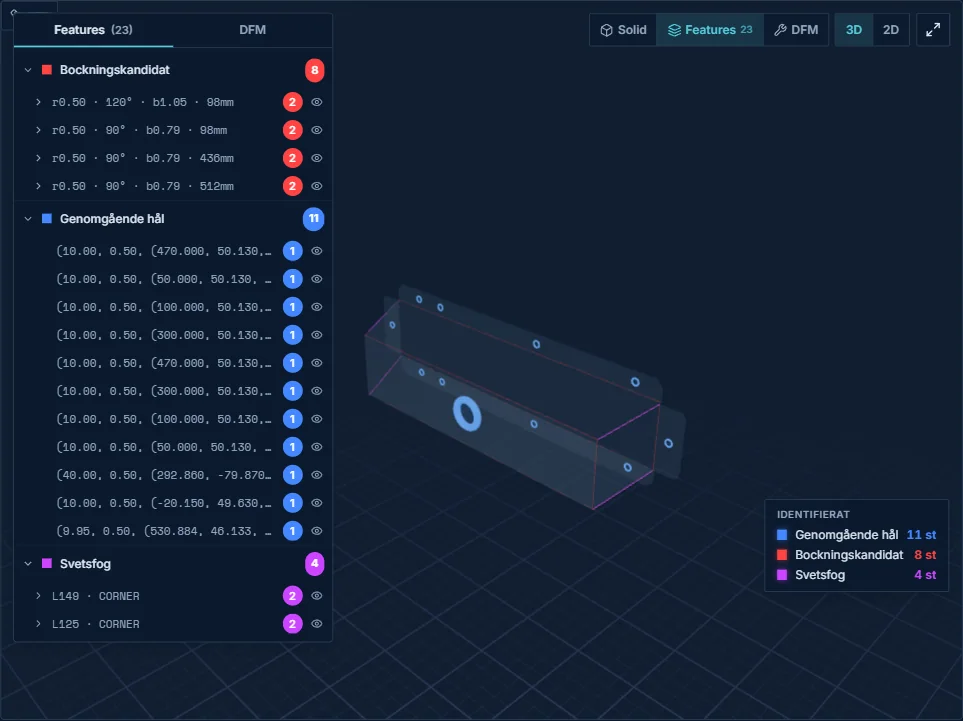
Glintify connects CAD, shop data and the quote
Glintify is a CAD-driven quoting platform for sheet metal shops. Geometry is analysed through defined calculation rules, known as deterministic analysis. Dimensions and features then feed costing based on the shop's selected materials, machine profiles and rules.
- Geometry provides measurable cost drivers such as cut length, internal contours and bends.
- DFM checks highlight manufacturing risks with measurements and configured limits.
- Material selection, quantity, machine profile, setup time and secondary operations feed the cost basis.
- Cost lines can be reviewed and uncertain cases flagged before quoting.
- The quote workflow takes the basis through to a PDF, customer link and digital acceptance.
Ask to see the calculation chain when evaluating AI for quoting
Test with your own part and a previous quote. Ask the supplier to show where inputs come from, how your shop data is used and which decisions the estimator must make. That reveals more than the quality of the written quote alone.
- Which dimensions came from CAD, and what was entered manually?
- Which machines, tools and process rules support the proposal?
- How do material, quantity and setup time affect each cost line?
- Which uncertainties need review before the quote is sent?
More AI increases the importance of the shop's calculation platform
Our reading of the launch is that specialised systems gain a clearer role as AI takes on more workflow tasks. The more steps an assistant supports, the more important the quality of its underlying measurements and calculations becomes.
For sheet metal shops, Glintify is the platform connecting the part to production capabilities and quote costing. That is the foundation needed when AI assistance must lead to a price you can stand behind.
Glintify's current press-brake tooling and machine selection support covers air bending. Other method choices, drawing requirements and uncertain results require the estimator's judgement, and costing needs shop-specific calibration. This article describes the systems' roles; it does not present a ready-made integration between Claude for Manufacturing and Glintify.
Frequently asked questions
Does Claude for Manufacturing replace sheet metal quoting software?
Anthropic describes Claude as assistance that uses existing systems and their inputs. Its product page says the manufacturer's quoting software stays in place. Glintify adds CAD analysis and shop-specific costing for sheet metal parts.
Can Claude use CAD tools?
Yes. Anthropic describes an Autodesk Fusion connector. Glintify's value lies in the chain from sheet metal geometry to process, tooling and costing inputs. What an AI assistant receives depends on the systems and connections actually in place.
Is there a ready-made Glintify and Claude for Manufacturing connection?
Such a connection has not been verified here. Glintify can be used for its own CAD and quote workflow. Any integration must be assessed and verified separately.
See what your own part needs before you can quote it
Bring a STEP file, the drawing and a previous quote. We will review what Glintify can measure, which shop data is needed and what the estimator should check before approving the price.
Book a costing walkthrough